Wednesday, November 30, 2016

e-Comm For Life!

When you take e-Communication classes, you aren't learning a subject, as much as a way to communicate - about anything. It's a lot like learning a new language - except this language lets you sense the world around you, think about it and feel it, and then communicate it to others with much more than words.


Share your passion

e-Communicate your passion!
e-Communication is how you can really reach people. What are you interested in?  What do you love doing? e-Communication gives you ways to share it with the world, when a vocabulary of words alone would be inadequate.

Not every e-Comm student is going to end up working in journalism, video entertainment, animation, graphic design, or web design. However, all of you will carry with you the skills from these areas to apply to any future career, hobby, or passion.


Noteworthy analogy

It's all about the drums.
To use my own experience as an analogy - music is what got me through junior high and high school. I earned my bachelors degree in music. By the time I finished that degree, I realized that I did not want to be a school music teacher. I taught lessons in a music store for a few years, while I tried out the life of a "full-time" professional musician. It didn't take long to decide that wasn't going to be my life-long career either. I finally got back to teaching school in other areas than music - BUT all my life there have been countless little ways that my music background has paid off. It's a hobby and a love. Through music, I can communicate wordlessly from parts of myself that are otherwise hidden and silent. I am able to donate my musical talents to good causes. My life experience would be much less rich, less interesting, less beautiful - without that background in music. e-Communication may turn out to be to you what music is to me.


Your superpowers

e-Comm may not turn into a life-long career for you, but it will stay with you - giving you enriched ways to see the world around you, and to communicate what you see and what you are passionate about. Your ability to get your ideas across through some combination of writing, video, animation, graphic design, and web design gives your communication extra range and impact.

You may have noticed e-Communication's new slogan:
Communicate, Collaborate, Innovate, DESIGN. 
This is the stuff that lasts, no matter what crazy new things happen with technology or software in your lifetime. We also hope you take away some project management and leadership skills, in addition to mastering the current technical content.


Use the Force!

Sure, we love to see e-Communication alumni make it as professional designers, animators, broadcasters, entertainers, and so on - but our goals go beyond that. We especially hope that all of our students take these skills, these different ways of seeing the world and communicating to others what you see, to enrich your everyday lives - and maybe even to change the world, regardless of your occupation.

Plus, there's always this, as Mrs. Morris puts it so succinctly:
"What we do is cool."

Mr. Olson


(This is a repost - originally from May 2015 on Mr. Olson's blog - molsononw.blogspot.com.)

Tuesday, September 13, 2016

Think you're not a leader? Think again.

Drew Dudley redefines leadership - in a way that aligns beautifully with what we in e-Communication refer to as leadership.


Wednesday, January 27, 2016

"I'm stumped - what should I blog about?"

e-Communication students have occasional required blog posts of various types that we think are important to assist in learning or demonstrate learning of e-Comm material.  However, to really have an interesting and well-rounded blog, you may want to also include other kinds of posts.


"What could I possibly blog about that would be interesting to others?"


Oh - about a hundred things.  Seriously.  In these two posts, a girl, obsessed lists many possible blogging ideas. If you're stuck on figuring out what to write - scan through these and chances are you'll be back writing great posts in no time:

Oh - and, by the waaaay... one category in this year's eMagine competition is for blogs. 

(Also see our To-Do List For a Better Blog.)


Friday, January 8, 2016

Blog of the Week -- January 8

Visit www.smalltalkwithcorbin.com
The blog of the week belongs to Mr. Corbin Eaton, a junior in the video focus.  Corey has a flair for writing in a humorous, casual style – and for incorporating strong photographs into his posts.

Corey has decided to jump over to the Weebly platform, and combine his blog and portfolio there. (Juniors and seniors in all focus areas are now permitted to use other platforms than Blogger – ask your teacher which platforms will work best for your focus area.)

Great job, Corey!


Tuesday, December 15, 2015

Blog of the Week - Ben Whitney

The Blog Of The Week for this last week of the semester belongs to e-Comm sophomore, Ben Whitney. You may not know Ben by sight, but you would definitely recognize his voice as one of the talented readers of our daily announcements.

Ben is taking graphic design and video, and is doing a great job with blogging project tutorials and reviews. Pay him a visit here: Whitney Designs.


Monday, November 30, 2015

Make a Bio page!

Pages?  We don't need no stinking pages!

Badges?
We don't need no stinking badges!
(Name that movie.)  Well, yes, we do need pages. So far on Blogger, you've been primarily making use of posts. Posts are the most common way to update a blog. They appear on your home blog page, and with time they get pushed down and off the main page by more current posts. Pages are more of a static entity. They stay put, and they are accessible by name from a menu on your site. You can put as much or as little on a page as you like - and you can add to them or edit them over time.

We will make a page for your Bio information, along with a handy link to it near the top of your blog.


Make a PAGE


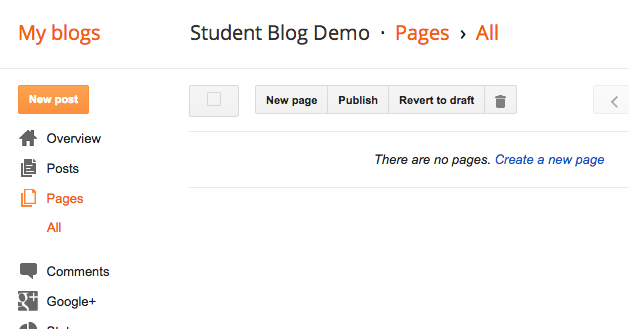
In your design menu, go to Pages, and then press the New page button at the top.


Name your page - About Me and Bio are typical names for this. You can always rename it later.

(This example was for something different.)


Add in the Content


Edit the page the same way you have been editing posts. This time, you need a photo (a semi professional one), a paragraph of bio info (you don't need as much as this example), and then your elevator pitch. (If you did not write your elevator pitch yet, the instructions are here.)

You only need 1 paragraph of bio info.
Instead of Skills, copy&paste your elevator pitch in here!


When finished, press the Publish button.

And... nothing happens.

That's because pages aren't blog posts - they come up by choosing them from a menu, as opposed to being displayed sequentially on your home page. So...

Add the Pages Gadget:


Now you need to go to your Gadgets in the layout menu, and scroll down to find the Pages gadget. Click the plus to add it.


This Pages gadget is basically a Pages Menu gadget.

Page names are on the left, and will only appear in the menu if you have their boxes checked.

Once the pages are checked, you may reorder them on the right side.  By convention, you should either place the Home page first or last.

(Yours will be Bio or About Me, instead of Graphics.)

Press Save when finished.


You may either position your Pages menu in one of the sidebar gadget spots, or...


... in a gadget at the top, in which case it looks like either a menu bar or tabs.


If your gadget doesn't show up, try moving it to a different location.


Test out the link in your gadget to make sure it is working.

Revisit your page now and then to keep it updated!


Here's another quick reference from Blogger on some of the details of pages and the pages gadget that were not covered above: Blogger Buzz

Friday, October 2, 2015

The 5 Guarantees + 3 Superpowers

The 5 Guarantees

By now, e-Comm students can probably rattle off the 5 Guarantees of e-Communication:

Technical Skills, Communication, Leadership, Collaboration, and Project Management

Doing well in each of these areas not only prepares them for careers in their e-Comm focus areas (graphic design, web design, animation, video entertainment, convergence journalism, or sports information), but also many other fields! Sure, we hope to encourage students to go into careers in their e-Comm focus area, but sometimes students also develop other strong interests along their way through high school - or college - or adult life. Will a nurse, a business person, or a pastor benefit from having skills in those five areas? Most certainly!

The Plus Side of Having Multiple Interests

This TED video is precisely about those people that have more than one interest - "multipotentialites" - and the difficulties they face as they try to decide "what they want to be when they grow up". It turns out that "multipotentialites" may also have some unique advantages or "superpowers", bestowed upon them by virtue of their multiple interests or skills.

So, for e-Comm students (and their parents) who aren't so sure that they will end up choosing an e-Comm-related career - it's OK! In addition to the 5 guarantees of e-Comm, you might also bring these superpowers to the table in whatever career(s) you find yourself:  

Idea Synthesis, Rapid Learning, Adaptability

Here's why, along with a look at some successful "multipotentialites":

Why some of us don't have one true calling - Emilie Wapnick